

Client Profiles
What is a client profile?
A client profile allows you to customize how the AFC tax engine interprets a request and returns tax results. Customizations include:
- Bundle
- Exclusion
- Tax Override
- AFC Tax Engine configuration
Why use a client profile?
Reasons to use a client profile include:
- Profiles are cached - this speeds up response times
- Using a client profile eliminates including the same customization, such as a tax override, in each CalcTaxes request
- Request a client profile containing customization file(s) and configurations be added to your client
- Specify the
client_profile_idin the header to apply the client profile to all requests run using that header
- Multiple profiles can be applied to your client ID. Examples uses for multiple profiles include:
- Separate configurations for different different types of transactions
- Separate configurations for child companies
- Testing new configurations
How to apply a client profile to a session
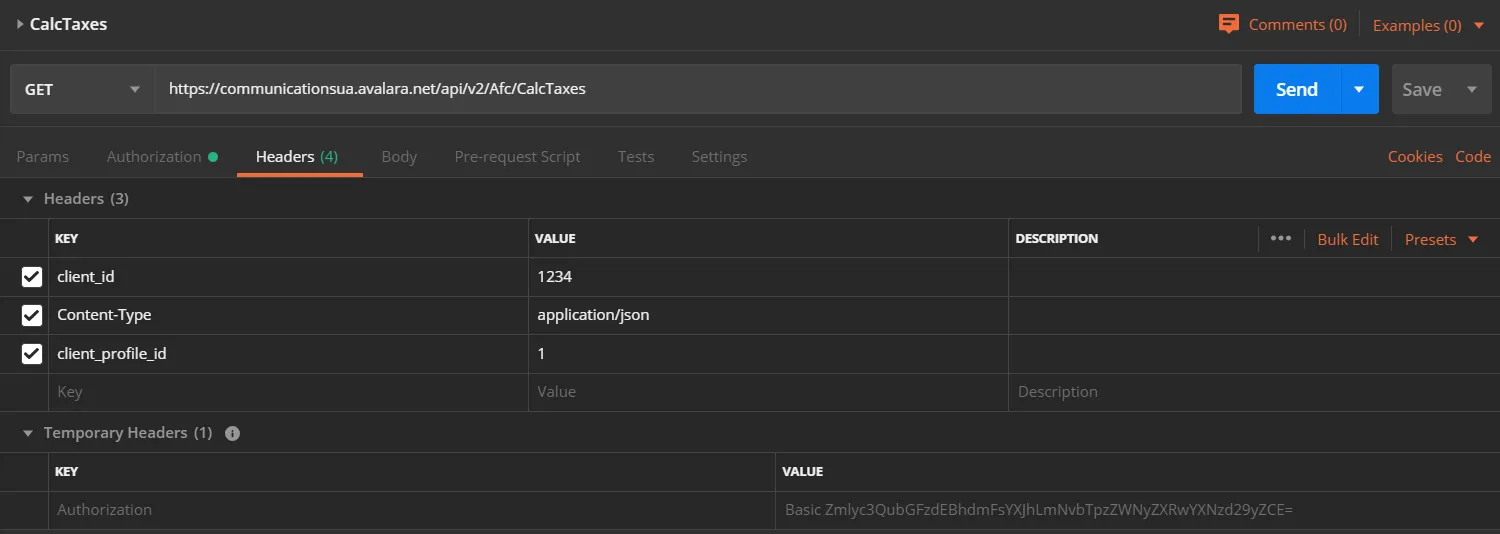
When authenticating to Communications REST v2, pass the client profile ID in the header using client_profile_id.
Postman example
Add these headers to your request:
Authorizationusing basic HTTP authenticNoteationclient_idContent-Type: application/jsonclient_profile_id
How to run transactions without a profile
REST v2 uses the system default profile when a profile is not specified.
To send a transaction without a client profile, modify the header using one of these options:
- Do not include
client_profile_id - Set
client_profile_idto “0”
Note
The system default profile is “0”.
Part of the Communications REST v2 Developer Guide integration guide. Open the full “Client Profiles” milestone on Avalara to see every page in this section.